> For the complete documentation index, see [llms.txt](https://docs.zipwire.io/llms.txt). Markdown versions of documentation pages are available by appending `.md` to page URLs; this page is available as [Markdown](https://docs.zipwire.io/zipwire-approve/a-tour-of-a-zipwire-timesheet.md).
# A Tour of a Zipwire Timesheet
A visual walkthrough of every feature on a Zipwire sheet (what most people call a timesheet) — flags, skills, verified proofs, and the actions available to approvers and processors.
A Zipwire sheet — what you might know as a timesheet, work sheet, or report sheet — is more than a list of hours. It's a verified record of work — with automatic anomaly detection, AI-extracted skills, and a cryptographic proof you can download and keep forever.
{% hint style="info" %}
**Why "sheet" and not "timesheet"?** We call it a **Sheet** in the product — you'll also hear it called a **work sheet** or a **report sheet**. A sheet is usually built from tracked time, but it doesn't have to be: the units billed can come from somewhere other than a clock. "Timesheet" implies time is always the underlying unit; "Sheet" deliberately doesn't assume that.
{% endhint %}
This page walks through every section of a real sheet so you know exactly what you're looking at.
{% hint style="info" %}
**Technical contractor?** Everything you see here can also be done from the command line. The Zipwire CLI lets you track time, create sheets, and send them without leaving your terminal — the same mental model as Git. See [Why the Zipwire CLI is a Big Deal](/tools-and-integrations/cli-introduction.md).
{% endhint %}
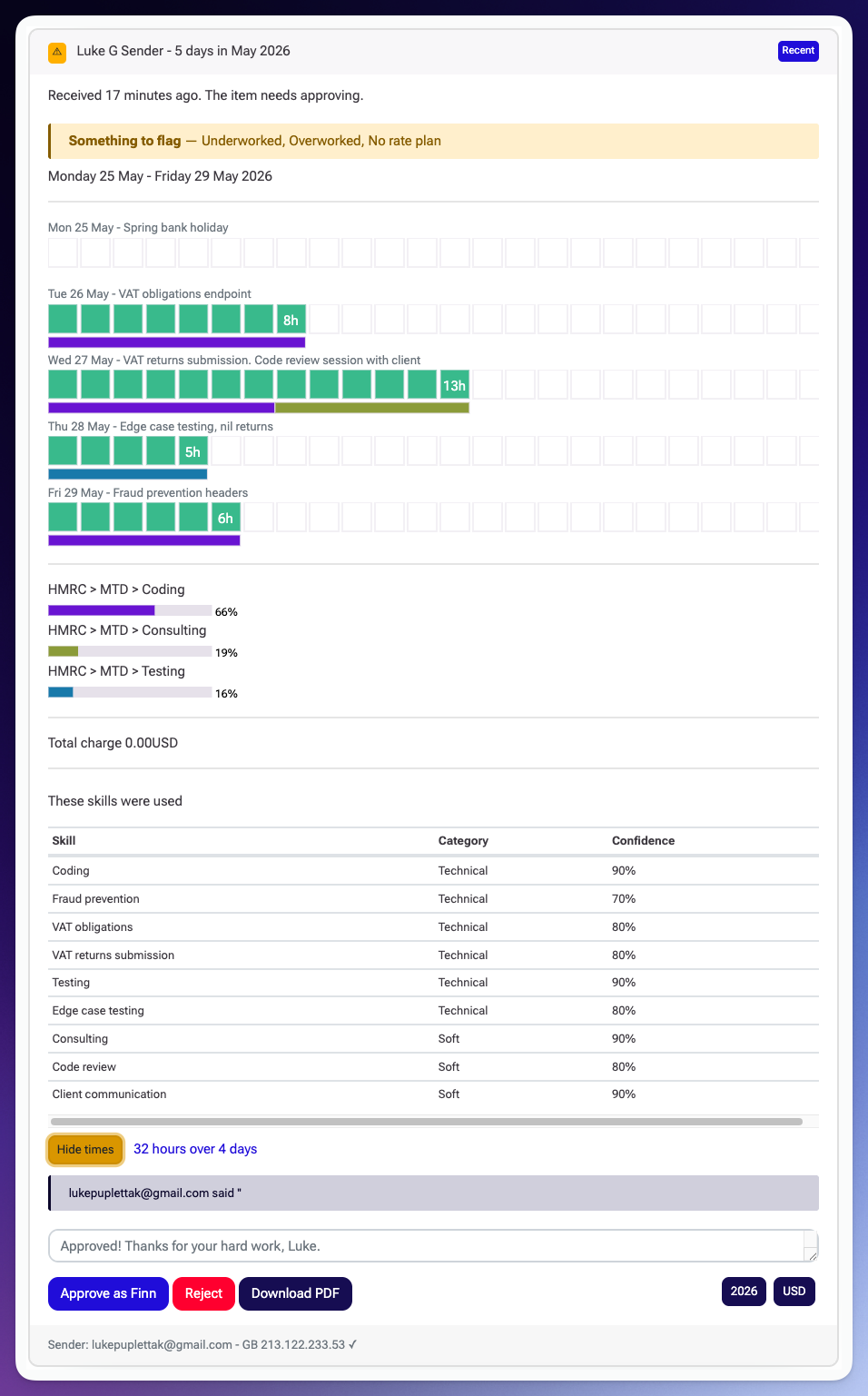
A complete Zipwire sheet with flags, skills extraction, and approval controls.
***
## The Card Header
At the top you see the sender's name, the number of days covered, and the period. Two badges can appear on the right:
* **Recent** — the sheet arrived recently and hasn't been acted on yet. It fades once the sheet has been reviewed.
* **Warning badge** — a visual signal that something on this sheet is worth attention before you approve. It appears whenever one or more flags are present (see below). You'll see this on the inbox list too, so interesting sheets stand out before you even open them.
Below the sender name, a timestamp shows when the sheet was received and its current status — here, *"Received 17 minutes ago. The item needs approving."*
***
## Flags
The flag banner calls out anything worth an approver's attention.
The orange **"Something to flag"** banner lists every condition Zipwire detected automatically. In this example: **Underworked**, **Overworked**, and **No rate plan**.
Flags are not a verdict — they don't block approval. They're information. The approver decides what to do with them.
Flags are recalculated if a processor adjusts which units are billed, so they always reflect the current billed state, not just the snapshot from submission.
See [Timesheet Flags](/zipwire-approve/unboxing-key-concepts/timesheet-flags.md) for the full list of conditions Zipwire checks for.
***
## Daily Time Bars
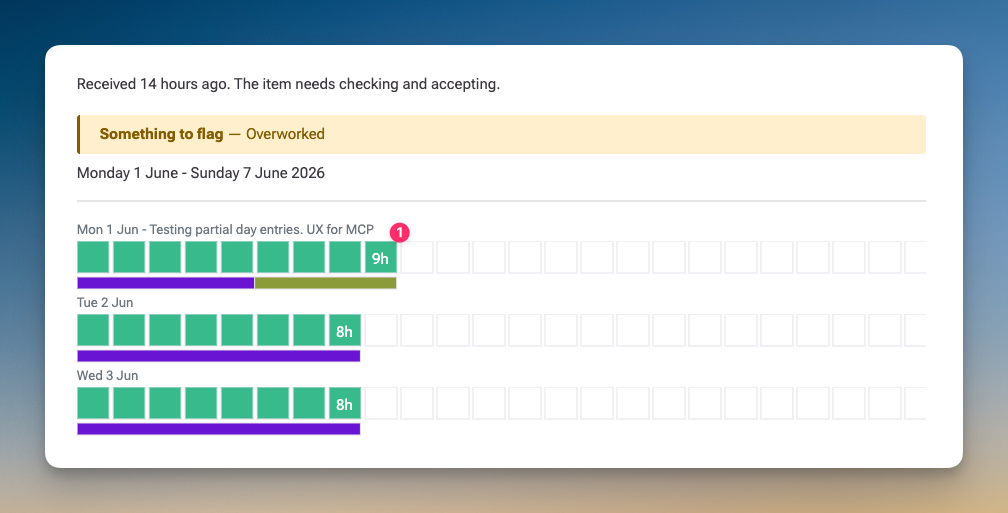
The body of the sheet shows one row per day. Each row has:
* The **date and a short activity description** — what the sender logged for that day
* A **coloured bar** representing billed hours, with the hour count displayed at the end
Days with no billable time — public holidays, weekends — appear as empty rows with a label. In this example, Monday 25 May is labelled *"Spring bank holiday"* with no bar.
The bars are colour-coded by activity, so at a glance you can see whether work was spread across multiple projects or concentrated on one.
{% hint style="info" %}
**Hourly vs. day rate billing.** The example above shows an hourly-billed contractor — each bar represents hours logged. For day rate contractors, Zipwire uses **half-day units** instead. The sender bills a minimum of half a day and a maximum you configure on their billing plan. The bars still appear, but they represent units (full days and half days) rather than raw hours. See [Billing Plans](/zipwire-approve/unboxing-key-concepts/billing-plans.md) to configure which model applies.
{% endhint %}
***
## Activity Breakdown
Below the daily rows, a summary chart shows how time was distributed across activities as percentages. This example shows:
* HMRC > MTD > Coding — 66%
* HMRC > MTD > Consulting — 19%
* HMRC > MTD > Testing — 16%
This gives agencies and approvers an instant read on what kind of work was actually done during the period, without having to add up each day manually.
***
## Total Charge
The billed amount is shown here. When a **No rate plan** flag is present — as in this example — the total will be £0.00 or $0.00. This means the sender submitted before a rate plan was configured on their workflow. The sheet can still be approved; billing can be resolved separately.
See [Rate Plans](/zipwire-approve/unboxing-key-concepts/rate-plans.md) for how rates are applied.
***
## Skills
The **"These skills were used"** section lists every professional skill the AI identified from the sender's activity descriptions. Each entry shows:
| Skill | Category | Confidence |
| -------------------- | --------- | ---------- |
| Coding | Technical | 90% |
| Fraud prevention | Technical | 70% |
| VAT obligations | Technical | 80% |
| Consulting | Soft | 90% |
| Client communication | Soft | 90% |
Skills are extracted automatically — the sender doesn't fill this in. The AI reads the activity names, companies, projects, and any notes, then identifies both technical and soft skills.
**These skills become part of the verified record.** When the sheet is approved, the skills are frozen into an immutable snapshot, included in a Merkle tree, and attested to the Base blockchain via EAS. The sender can then generate a selective-disclosure proof — a signed token that cryptographically proves they used a specific skill, without revealing their client, rates, or any other fields they choose to keep private.
See [Skills Extraction](/zipwire-approve/unboxing-key-concepts/skills-extraction.md) and [Verifiable Timesheets](/zipwire-approve/verifiable-timesheets.md) for how this works.
***
## Hours Summary and View Controls
At the bottom of the time section, a summary line shows total hours and the number of working days: *"32 hours over 4 days."* This accounts for the public holiday — five calendar days, four billable.
The **Hide times** button collapses the day-by-day bar chart, leaving just the activity breakdown and totals. Useful when you're scanning a busy inbox and only need the headline figures.
***
## Comments
The comment thread lets approvers, processors, and senders exchange messages directly on the sheet. The conversation is part of the sheet's history and audit trail.
In this example, the approver has already left a note: *"Approved! Thanks for your hard work, Luke."*
***
## Actions
Three buttons appear at the bottom:
* **Approve** — approves the sheet as the current user. The button label reflects your role: *"Approve as Finn"* in this example. On approval, the frozen record is created, the Merkle tree is built, and attestation to the blockchain begins automatically.
* **Reject** — sends the sheet back to the sender with the option to add a reason.
* **Download PDF** — generates a PDF of the sheet. For approved sheets this is a **verified proof** — a signed document that includes the attestation details and can be shared as evidence of the work.
***
## What Happens After Approval
Approval triggers several things automatically:
1. The sheet is locked — no further edits
2. A frozen record is created capturing all fields, skills, and context
3. A Merkle tree is built from the frozen data
4. The Merkle root is attested to the Base blockchain via EAS
5. The sender can generate selective-disclosure proofs from the verified record
The result: an approved Zipwire sheet is not just a document — it's a cryptographically verifiable proof of work that the sender can carry with them, share selectively, and use to prove experience without revealing anything they don't want to.
See [Verifiable Timesheets](/zipwire-approve/verifiable-timesheets.md) to learn more.
***
## Learn More
{% content-ref url="/pages/ZtmlRIhT3qTCeoUYY5T1" %}
[Timesheet Flags](/zipwire-approve/unboxing-key-concepts/timesheet-flags.md)
{% endcontent-ref %}
{% content-ref url="/pages/2z6WecyLa8YDtBkj0K6K" %}
[Skills Extraction](/zipwire-approve/unboxing-key-concepts/skills-extraction.md)
{% endcontent-ref %}
{% content-ref url="/pages/bBE0TkceIu9QSt3a5zX3" %}
[Verifiable Timesheets with Selective Disclosure](/zipwire-approve/verifiable-timesheets.md)
{% endcontent-ref %}
{% content-ref url="/pages/HMQINGP6nnIrp2MV6EP0" %}
[Rate Plans](/zipwire-approve/unboxing-key-concepts/rate-plans.md)
{% endcontent-ref %}