> For the complete documentation index, see [llms.txt](https://docs.zipwire.io/llms.txt). Markdown versions of documentation pages are available by appending `.md` to page URLs; this page is available as [Markdown](https://docs.zipwire.io/use-cases/for-agents/using-claude.md).

# Using Zipwire with Claude

[Claude](https://claude.ai) is an AI assistant made by Anthropic. You can connect it to Zipwire so it can manage your timesheets, activities, workflows, and more on your behalf—just by asking in plain English.

***

## Which Claude Supports Zipwire?

Claude comes in a few forms:

| Surface                              | Zipwire Support                                               |
| ------------------------------------ | ------------------------------------------------------------- |
| **Claude Desktop** (Mac/Windows app) | Yes — add Zipwire as an MCP server in Settings → Connectors   |
| **Claude.ai** (web browser)          | Yes — add Zipwire under Customize → Connectors (Pro/Max)      |
| **Claude mobile** (iOS/Android)      | Yes — inherits connectors configured on Claude.ai web         |
| **Claude Code** (developer CLI)      | Yes — configure as an MCP server in your Claude Code settings |

All surfaces connect to the same Zipwire MCP server at `https://zipwire.io/api/v1/mcp`.

***

## Connecting Claude Desktop

See the full step-by-step guide: [Zipwire MCP Server](/use-cases/for-agents/zipwire-mcp-server.md)

The short version:

1. Log in to [Zipwire](https://zipwire.io) in your browser
2. In Claude Desktop, go to **Settings → Connectors**
3. Add a new server with URL `https://zipwire.io/api/v1/mcp`
4. Click **Connect** and authorize in the browser window that opens
5. Ask Claude to help with your timesheets

***

## Connecting Claude.ai (Web or Mobile)

1. Log in to [Claude.ai](https://claude.ai) in a desktop browser
2. Go to **Customize → Connectors** (Pro/Max) or **Organization settings → Connectors** (Team/Enterprise)
3. Click **Add Custom Connector** and paste `https://zipwire.io/api/v1/mcp`
4. Authorize the connection

Once configured on the web, the connector is automatically available in the Claude mobile app.

***

## Claude in Action

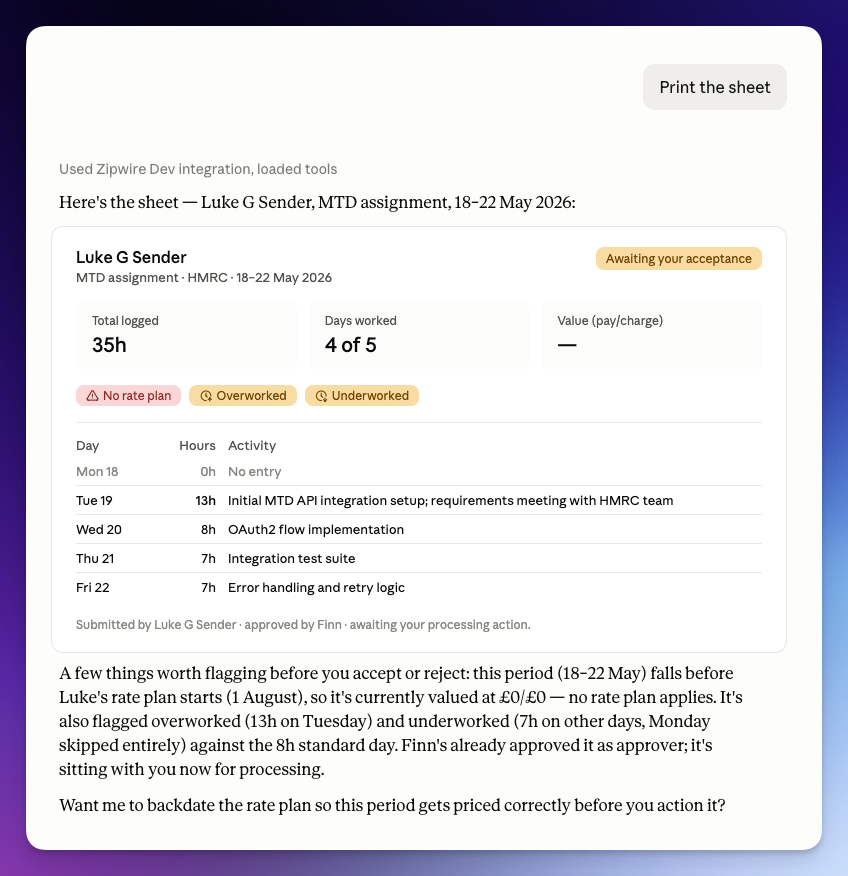
<figure><img src="/files/EvWYqvMUY44HXqyA2U1S" alt="Claude Desktop rendering a Zipwire timesheet for Luke G Sender, MTD assignment 18–22 May 2026, showing flags for No rate plan, Overworked, and Underworked, with Claude&#x27;s contextual commentary below"><figcaption><p>Claude Desktop loads the timesheet via the Zipwire MCP integration, spots the flags, and proactively asks whether to backdate the rate plan — all without being asked.</p></figcaption></figure>

In this example, Claude fetched a timesheet for processing. Without any prompting, it noticed that the period predates the sender's rate plan start date (explaining the £0 charge), flagged that Tuesday was billed at 13 hours against an 8-hour standard day, and identified the underworked days. It then offered to fix the rate plan backdating before the processor takes any action.

That's the difference between a tool that retrieves data and one that understands it.

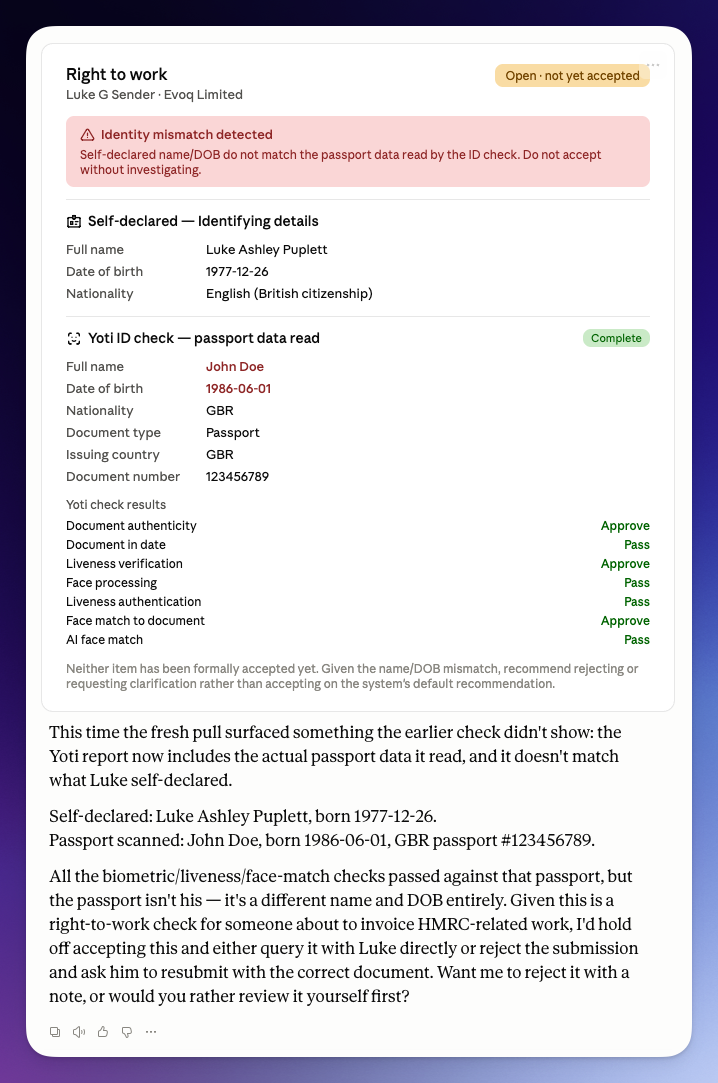
<figure><img src="/files/08hySizT2T1S8fXETpDd" alt="Claude Desktop rendering a Right to Work collection for Luke G Sender at Evoq Limited, with a Yoti ID check flagged as Identity mismatch detected: self-declared name Luke Ashley Puplett, DOB 1977-12-26, versus passport data read as John Doe, DOB 1986-06-01, with all individual Yoti sub-checks showing Approve/Pass, and Claude&#x27;s commentary recommending rejection below"><figcaption><p>All of Yoti's automated checks—document authenticity, liveness, face match—passed. But Claude read the actual passport data in the report and caught that it belonged to someone else entirely.</p></figcaption></figure>

Here Claude pulled up a [Right to Work](/use-cases/identity-checks-right-to-work.md) collection mid-review. Every individual Yoti check on the card was green: the document was genuine, the liveness check passed, the face matched the document. But green checkmarks only confirm the passport is real and the selfie matches the passport—they say nothing about whether the passport belongs to the person who submitted it. Claude compared the self-declared identity (Luke Ashley Puplett, born 1977) against the data Yoti actually read off the document (John Doe, born 1986) and surfaced the mismatch that the pass/fail badges alone would hide, recommending the submission be rejected or queried rather than accepted on the system's default.

This is what the [Collect](/zipwire-collect/effortless-document-collection-for-any-need.md) → [Yoti ID check](/use-cases/identity-checks-right-to-work.md) → Claude pipeline looks like in practice: Zipwire Collect gathers the evidence and runs the automated IDVT checks, and Claude adds a layer of scrutiny on top—reading the underlying data, not just the verdicts—before a human signs off. The kind of cross-check that's easy for a person to skip when every box on the card looks green.

***

## What Claude Can Do in Zipwire

Once connected, you can say things like:

* *"Show me my timesheets waiting for approval"*
* *"Create a time entry for today—8 hours on the Acme project"*
* *"What's on my Zipwire dashboard?"*
* *"Are there any timesheets with flags I should look at?"*
* *"Backdate the rate plan on this workflow to cover this period"*

The tools available depend on your Zipwire role. See [Available Tools by Surface](/use-cases/for-agents/zipwire-mcp-server.md#available-tools-by-surface) for the full list.